


Your Boolean, read as written

November 13, 2026
On this page
How Findem's new Boolean Search works with the strings recruiters already use in LinkedIn Recruiter.
Most sourcers carry a handful of Boolean strings they trust. They built those strings over years in LinkedIn Recruiter, refined them one req at a time, and pasted them into whatever tool the job calls for that week. The strings travel well. The way each tool reads them does not.
That gap stays invisible until it costs you a search. A missing parenthesis, a lowercase "or," or a NOT in the wrong place can turn a precise query into a loose one, or into zero results with no explanation. Findem's new Boolean Search is built to close that gap for the strings recruiters already know.
Boolean is a shared language with local dialects
AND, OR, and NOT look universal. They aren't. Each platform decides whether operators must be capitalized, which operator wins when you mix them, how it treats a space between two words, and where NOT is allowed. Google X-ray uses a minus sign for exclusion. LinkedIn Recruiter requires capitals and evaluates in a fixed order: quotes, then parentheses, then NOT, then AND, then OR. So LinkedIn reads Nurse OR Technician AND Surgery as Nurse OR (Technician AND Surgery), which is rarely what the searcher meant.
Glen Cathey, whose Boolean Black Belt blog trained a generation of sourcers, has argued for years that effective search depends on critical thinking, not Boolean logic for its own sake. He makes the same case for AI-powered sourcing today. The operators are a means to finding the people who fit, and that only works when the recruiter can see how the system interpreted the request.
Where Findem fell short
Before this release, recruiters told us three things. They couldn't find where to add a Boolean string, because the entry point was a click into white space that opened a modal. Once they added one, the string didn't look like what they wrote. The modal recast it as "is / is any of" and split it into separate pills. And a string with a stray bracket or quote saved without warning, then searched for the wrong thing and often returned zero candidates.
When results didn't match their intent, recruiters didn't troubleshoot. They left the search. These are people fluent in Boolean, so the problem was never skill. Findem gave them no way to confirm it had understood them.
What changes
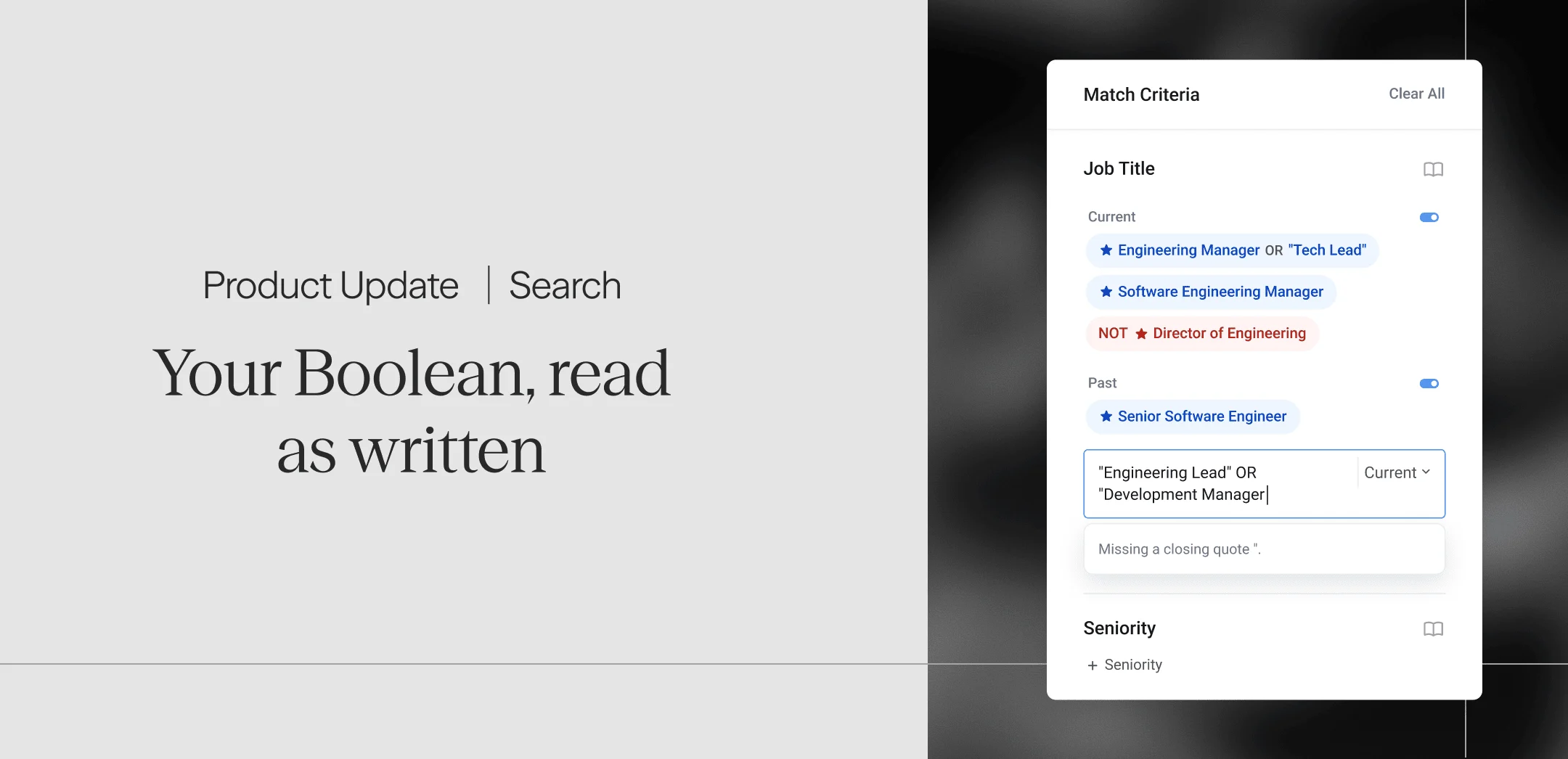
Boolean now lives where you search. Five categories in the left nav (Job Title, Skills, Companies, Education, and Keywords) each have an add row that opens a text box in place. A selector inside the box sets the sub-section, such as Current or Past for titles and Must have or Nice to have for skills. Type a term, pick a suggestion, or paste a full string.
Your string stays intact. A string like (Staff OR Principal) AND Engineer AND NOT Intern becomes one chip that reads exactly as written, and you can edit, exclude, highlight, or delete it like any other chip. Before you add it, a preview card shows how Findem will read the logic.
Findem catches mistakes before they cost you results. Pause while typing, and Findem explains what needs fixing, such as an "AND" with no term after it. Press Enter on an invalid string, and the box turns red, nothing is added, and your text stays put so you can correct it.
What carries over from LinkedIn Recruiter, and what to adjust
Most strings port directly because Findem follows the conventions LinkedIn Recruiter users already rely on.
| Rule | LinkedIn Recruiter | Findem |
|---|---|---|
| Operator case | AND, OR, NOT in capitals | Same; lowercase "and" is read as part of the term |
| Mixing AND and OR | AND is evaluated before OR | Same; use parentheses when you mix them |
| Exact phrase | Quotes | Quotes |
| Grouping | Parentheses | Parentheses |
| Excluding a term | NOT can follow any term | NOT goes after AND, as in Python AND NOT Java; OR NOT isn't supported |
Two habits need adjusting. Write exclusions as AND NOT, since a group can't open with NOT. And remember that unquoted words form one term in Findem, so Product Manager is a single term, not Product AND Manager. When a category holds several chips, Findem treats them as OR, so requirements that must all be met belong in one chip joined by AND. If a string needs a tweak, the validation message tells you what to change.
Boolean, plus what Findem knows
Cathey calls the cost of literal search "dark matter," meaning the qualified profiles a search never surfaces because people describe the same experience in different words. A keyword string only finds the words you thought to include.
Findem evaluates each term in your Boolean string on its own, and the chip shows the choice it made. A term Findem recognizes, like Software Engineer, maps to a curated attribute, marked with a star, that already includes common variations of that title. A term it doesn't recognize gets a Similar To match on related wording. A term in quotes matches that exact phrase and nothing else. Saved company lists work by name, so All Automotive Companies OR Tesla extends a list you've already built.
That puts the precision-versus-breadth decision in the recruiter's hands, one term at a time. Quote "Head of Talent Acquisition" when the exact title matters. Leave the quotes off when you want Findem to find the people who wrote it differently.
Availability
Boolean Search began rolling out to customers in our Alpha and Beta programs on October 20, 2026. It works in Job Title, Skills, Companies, Education, and Keywords. Other categories keep their existing picker for now. Findem University has a two-minute walkthrough, and your CSM can tell you how to join the Beta.
The strings you've spent years refining should mean the same thing wherever you run them. Bring them into Findem, check the preview, and spend your time on candidates instead of syntax.